TeleFarm™ LSMP LoRaWAN® monitoring

Connect field sensors through a private LoRaWAN® network that you own and Zenseio™ typically manages. LSMP-2103 stations report through shared gateways, reaching sites beyond cellular coverage.

  • Shared gateway coverage
  • Private LoRaWAN® network
  • Battery or SOLIK™ solar
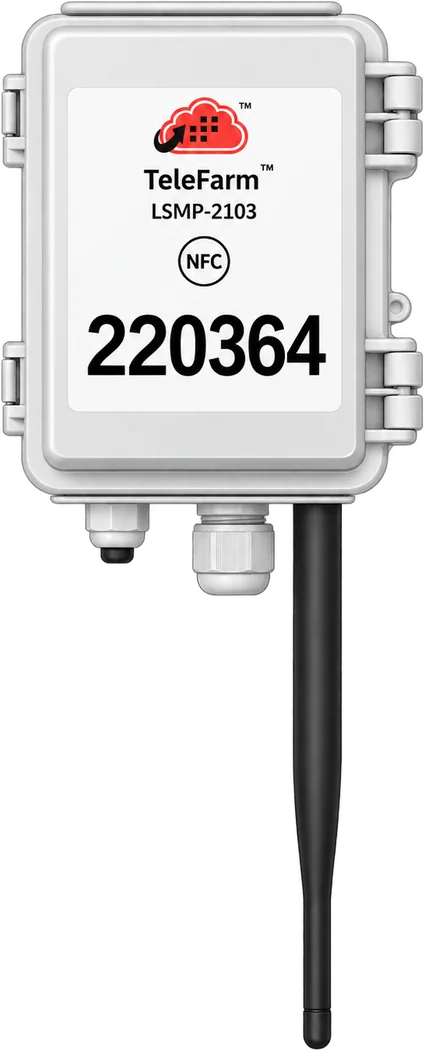
TeleFarm LSMP-2103 telemetry device

01 / LSMP

A private network for your service area

LSMP-2103 uses a low-power LoRaWAN® radio network. Gateways receive readings from field devices and forward them over the internet. For rural deployments, Zenseio™ typically manages a private network that you own, with gateways placed where cellular or Ethernet internet is available. Each field device only needs LoRaWAN radio coverage.

  • A planned private deployment can serve hundreds of devices across a service area spanning several to dozens of miles. Coverage depends on gateway placement, terrain, antennas, and radio conditions; validate it for each site.
  • Lower station hardware and ongoing costs can make private LoRaWAN especially economical for denser deployments, where many stations share gateways. Include gateway installation, internet service and network maintenance when comparing total costs.
  • Low device power use can let remote battery-powered sensors run for years between service visits. Battery life depends on the connected sensors, reporting schedule, radio conditions, and temperature.

02 / LSMP

LSMP installations in the field

LSMP stations monitor sites from orchard rows to reservoir banks. These installations show how the devices fit alongside crops, weather instruments, and irrigation equipment.

03 / LSMP

LoRaWAN®, in three steps

An LSMP station connects field instruments, such as a soil probe or rain gauge, to nearby LoRaWAN® gateways. The gateways pass readings over the internet to your application.

  • LoRaWAN® radio
  • Gateway internet connection

Gateway 2 brings stations 4 and 5 into range. Both gateways can hear station 3 and forward the same reading to the cloud.

  1. 01

    The station takes a reading

    An LSMP station collects readings from its connected sensors and sends a small radio message.

  2. 02

    Gateways forward the message

    Any gateway in radio range can receive the same message and forward it to the cloud network server over a cellular or Ethernet internet connection.

  3. 03

    Your software receives the data

    The network server removes duplicate copies and routes the readings to your chosen application, where your team can view them.

  • A single gateway serves many field devices in a star topology. Each device transmits directly to the gateway without pairing with it. Devices are registered with the LoRaWAN network, and any gateway on that network within radio range can hear them.
  • Adding in-field gateways creates a star-of-stars topology. Extra gateways extend coverage, and overlapping coverage gives stations a second path if one gateway or its internet connection goes down. Gateway placement, terrain, and antennas determine actual coverage.

04 / LSMP

Connect the instruments you need

Combine a compatible SDI-12 soil probe or weather station with instruments such as a tipping-bucket rain gauge, pressure transducer, or flow meter. Three configurable general-purpose inputs and a selectable auxiliary power output support different sensor combinations.

  • General-purpose input modes include switch state, pulse counting, analog voltage, 4–20 mA current, and digital temperature sensing. Available modes depend on the terminal.
  • New LSMP-2103 hardware supports SDI-12 or RS-485 Modbus RTU. Select one sensor bus at a time.
  • Selectable sensor power supports compatible instruments; check the model specifications for electrical ratings.
  • Set high and low thresholds on supported inputs to trigger alert messages when readings cross a limit, such as a rise in reservoir level.

05 / LSMP

Rugged housing. Flexible field power.

LSMP-2103 can sleep between scheduled readings to conserve power. A UV-resistant NEMA 4X polycarbonate enclosure houses the electronics, with a pressure vent, mounting bracket, and external antenna.

  • Choose a field-replaceable primary lithium battery or optional SOLIK™ solar charging for compatible configurations with sustained sensor loads.

06 / LSMP

Configure the device and put its data to work

Use ZenConfig™ to read and change supported settings from an NFC-enabled phone. A compatible LoRaWAN® network can deliver readings to your application, with device health and measurements available through configured Zenseio™ dashboard services.

07 / LSMP

LSMP-2103 specifications

Specifications for new hardware. Choose supported instruments and a power configuration suited to your installation.

LSMP-2103 product sheet
FeatureDetails
ConnectivityLow-power LoRaWAN® Class A through a compatible private gateway network. Place gateways where cellular or Ethernet internet and suitable power are available.
Sensor-bus selectionSDI-12 or RS-485 Modbus RTU. Both are included on new hardware; select one sensor bus at a time.
Sensor connectionsOne supported SDI-12 instrument plus three configurable general-purpose inputs. A multi-depth probe or weather station can supply several measurements through its single SDI-12 connection.
General-purpose inputsSwitch state and pulse counting; 0–24 V analog voltage, 4–20 mA current, resistance/thermistor and digital temperature modes on the inputs that support them. Available modes depend on the input and device hardware.
Modbus measurement supportRS-485 Modbus RTU: one sensor address, read functions 1, 2, 3 and 4. Current ZenConfig™ supports up to nine active read commands. Confirm the instrument’s register map and power requirements.
Sensor powerSelectable 5, 8, 9 or 12 V DC auxiliary output. Match the voltage and total sensor load to the installation; some instruments need continuous power.
Power optionsField-replaceable primary lithium battery or compatible SOLIK™ rechargeable solar setup. Multi-year battery life is possible, but depends on sensor load, sampling/reporting frequency, radio conditions and temperature.
EnclosureUV-resistant polycarbonate, NEMA 4X, with pressure vent, external antenna and mounting bracket.
Enclosure dimensions4½ × 5¼ × 3 inches (approximately 114 × 133 × 76 mm). Allow additional space for mounting, cables and the antenna.
Reporting and alertsConfigurable reading/reporting schedules and supported high/low input threshold alerts. With buffering configured, LSMP can store sensor readings in internal memory when a gateway is down or loses its internet connection, for example during a Starlink outage. Remote alert delivery depends on connectivity and the configured alerting service.
Configuration and serviceOffline NFC configuration with ZenConfig™ on supported iPhone and Android devices. Offline USB firmware service with ZenUpdate™ in desktop Chrome on macOS and Windows, using a prepared laptop and supported adapter.
Published temperature range−40 to +140 °F (−40 to +60 °C). Connected sensors and rechargeable-battery charging can impose narrower limits; confirm the complete installation’s operating conditions.
Data accessDeliver measurements through a compatible LoRaWAN® network server to your chosen application. Configured Zenseio™ services can provide dashboard views of device, sensor and gateway health.

Reviewed

Choose radio hardware and regional configuration appropriate for the deployment country, such as US915, AU915, or EU868. Plan gateway placement, power, internet connection and ongoing network maintenance.

Service-area coverage is a deployment design decision. Terrain, antennas, gateway placement and radio conditions determine the actual links; validate coverage at the intended sites.

08 / LSMP

Questions about LSMP

Straight answers to help you choose the right setup.

Do I need a public LoRaWAN® network available?

No. Public LoRaWAN® coverage is often limited in rural areas, so Zenseio’s primary rural solution is a private LoRaWAN® network that you own and Zenseio™ manages. Gateways link nearby field devices to cellular or Ethernet internet where that infrastructure is available.

How large can the private network be?

A planned deployment can serve hundreds of devices across a service area spanning several to dozens of miles. That describes the overall service area; individual device-to-gateway distances vary. Terrain, antennas, gateway placement and radio conditions determine coverage.

What maintenance does a private network add?

Plan to maintain gateway power, internet connection and network operation as well as the field devices. Direct cellular CSMP devices avoid that local gateway infrastructure; LSMP offers low-power field links and shared private-network coverage.